Pro Plan
14 days left of your trial. Upgrade here.
Welcome to HYPD, Philip
Connect your data and plug it into your AI assistant to run marketing work safely.
Get set up
0 of 3 complete
Sources
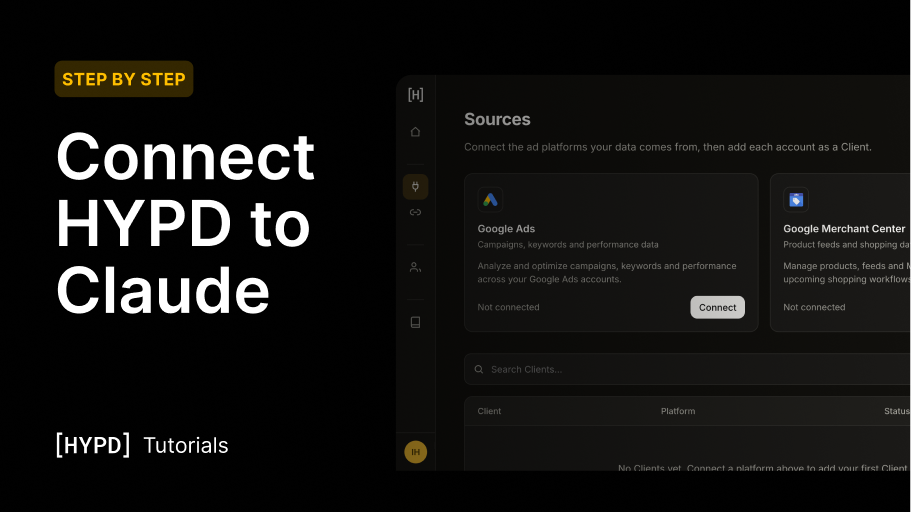
Connect the ad platforms your data comes from, then add each account as a Client.
Google Ads
Campaigns, keywords and performance data
Analyze and optimize campaigns, keywords and performance across your Google Ads accounts.
Not connected
Google Merchant Center
Product feeds and shopping data
Manage products, feeds and Merchant Center access for upcoming shopping workflows.
Not connected
| Client | Platform | Status |
|---|---|---|
No Clients yet. Connect a platform above to add your first Client. | ||
Connectors
Plug HYPD into the tool you actually work in, via MCP connector or CLI. Your audits, reports and campaign analysis come along.
Claude
Connector
ChatGPT
Connector · Soon
Codex
CLI · Soon
Other
Any MCP tool
1
Copy your MCP URL
This is HYPD's MCP endpoint. Your assistant uses it to reach your connected accounts.
2
Add & authorize in Claude
Connect HYPD as a custom MCP connector inside Claude.ai. Your connected accounts come along automatically.
- Open
claude.ai/customize/connectorsand click Add custom connector. - Paste the URL from Step 1.
- Click Authorize. Claude will hand off back to HYPD.
3
Come back here
Once Claude confirms the auth, HYPD picks it up automatically. You can leave this tab open.
Listening for the handshake
This page updates to Connected automatically once Claude authorizes, usually within a few seconds.
Client Context
| Client Name | URL | Vertical | Industry |
|---|
Prompt Library
| Title | Favorite | Platform | Tags |
|---|
Tutorials
Step-by-step guides and walkthroughs to get the most out of HYPD.